Sunday, October 3, 2010

OSGD on Oracle Technology Network (webcast)

During Oracle Open World 2010 (including JavaOne/Oracle Develop) a interview with John Bondi was recorded. John spoke about the Secure Global Desktop products history, present and future.

One interesting note:

Oracle and the SGD-product history together goes back to 2002, far before the Oracle-Sun merger and even before Sun bought the old Tarantella product.
(The history of Everett and the SGD-product is of the same age :) )


More Desktop Virtualisation presentations from OOW2010 on OTN can be found on the "Think Thin"-blog.

Tuesday, September 28, 2010

Oracle Secure Global Desktop 4.6 Screenshots

Although Oracle Secure Global Deskop (OSGD) 4.6 is the first Oracle release of the product and Oracle re-branded the Look and Feel, the new release contains some very good innovations. More on these changes (like Automatic Recovery after Array Failover, Dynamic Launch and Dynamic Drive mapping) in later posts. This post contains a few screen shots of OSGD 4.6 to show the new colors.

To start the list of screen shots the Login page:

Login Screen


My personal favorite is the Splash-screen. The screen that looks to control the login-procedure, but in fact it contains a subtle animated-gif. The real work is done in an invisible page on the background.
Splash Screen


And then after login to OSGD the Webtop. The main page of the product for all users, where the user applications can be started/controlled.
OSGD Webtop

There are more screens which have been re-branded, in fact all the screens of both the Webtop and the Web Admin GUI contain the new Look&Feel, but it will be too much for this post to shown them. There is however one small thing to show: The 'new' session names:
New session names
In the former versions the sessions were named like: Session 1, Session 2, etc. Changing these to timestamps make it much easier to identify the sessions :)

Monday, September 27, 2010

Oracle Secure Global Desktop 4.6

As stated in the beginning of this year Oracle has committed to keep Secure Global Desktop alive. With the release of the new Oracle SGD 4.6 they show to not only keep the product, but also continue in the development :)

"The new capabilities delivered in Oracle Secure Global Desktop 4.6 underscore our focus on making applications easier to deploy, manage and support in virtualized datacenter environments."
Wim Coekaerts, senior vice president, Linux and Virtualization Engineering, Oracle


Oracle Secure Global Desktop 4.6 has been released on September 10, 2010 and can be downloaded via the 'old' Sun Download Site.

Documentation of OSGD 4.6 (Oracle document collection):

Oracle Secure Global Desktop 4.6 is the latest of many new desktop virtualization products and capabilities recently announced including new releases of Oracle VM VirtualBox, Sun Ray Software and Oracle Virtual Desktop Infrastructure. This demonstrates Oracle’s continued commitment to providing a comprehensive desktop to datacenter portfolio.

Saturday, February 6, 2010

Secure Global Desktop stays alive after Oracle Sun merger

On January 27, Sun and Oracle have been merged into one company; Software. Hardware. Complete.

Oracle is continuing the Secure Global Desktop product as part of their virtualization technology group. The product has been placed within the Desktop Virtualization portfolio.

The announcement has made by Edward Screven, Chief Corporate Architect, during his webcast: "Oracle + Sun: Virtualization Strategy".
The sheets of this presentation are down loadable as well.

Good news for everyone working with Sun Secure Global Desktop or should we now refer to the product as Oracle Secure Global Desktop :)

Secure. Global. Desktop. Complete.

Friday, November 13, 2009

Secure Desktop, Going beyond the default security ...

On November 10, 2009 Sun Microsystems Netherlands organized a Sun Desktop Update Seminar for customers and Sun partners. The focus of this seminar was the new enhancement and possibilities of the Sun Desktop products focused on the new versions of Sun Virtual Desktop Infrastructure, Sun Ray Server Software and Sun Secure Global Desktop.

I was one of the speakers of this seminar and gave a presentation on the (new) security aspects and deployment options of Sun Secure Global Desktop.

Download theslides of my presentation:
Secure Desktop, Going beyond the default security ... .

Find here download links to the other presentations.

Sunday, August 2, 2009

SSGD modifying Apache and Tomcat for production

Installing and configuring Sun Secure Global Desktop for testing is easy. Most administrators use the same steps to install SSGD on an Acceptance and/or Production environment, but the requirements for a Acceptance/Production environment should be a bit different. When exposing a service to the Internet the service is open for anyone including people with less positive intentoions.

SSGD is secure by design and the security certifications are enough for Intelligence Agencies to use SSGD as their product for remote access to applications.

There are however minor modifications possible for the SSGD web server to enhance the security even more. For instance the default installation of SSGD provides the version and the installed modules of the Apache web server.

It is advisable to check / modify the configuration as described below.

Remove version information from server response header field:
Add the following line in the server config part of httpd.conf. If you don't know where place it below the 'ServerRoot'-directive.

ServerTokens Prod
(file /opt/tarantella/webserver/apache/<version>/conf/httpd.conf)


Remove directory listings of directories without default web-page (apache):
Edit http.conf and for every line starting with 'Option' add the minus sign for 'Indexes'. For example:

change in file /opt/tarantella/webserver/apache/<version>/conf/httpd.conf
Options Indexes FollowSymLinks
to
Options -Indexes FollowSymLinks

Remove directory listings of directories without default web-page (tomcat):
Open file web.xml and look for ' listings'. Set the param-value to false. This setting is correct in some versions of SSGD.

change in file /opt/tarantella/webserver/tomcat/<version>/conf/web.xml
<init-param>
  <param-name>listings<:/param-name>
  <param-value>true<:/param-value>
</init-param>

to
<init-param>
  <param-name>listings<:/param-name>
  <param-value>false<:/param-value>
</init-param>

Remove stack-traces for erroneous jsp-files:
This option is very usefull on production servers when for instance the Look&Feel of the webtop pages has been altered. The simplest way is to show a default error-page for erroneous pages. When the error-page does not exsist Tomcat will return an empty page (hence no java stack traces).
change in file /opt/tarantella/webserver/tomcat/<version>/conf/web.xml
</web-app>
to
<error-page>
  <exception-type>java.lang.Exception</exception-type>
  <location>/internalError.html</location>
</error-page>
</web-app>
For more SSGD Security information (including these options) take a look at the 'Secure Deployment Checklist' at wikis.sun.com. An other good article is: 'HOWTO Secure Access to the Administration Console'.

Just keep in mind connecting any server to the Internet requires good security settings independent on how secure the product is by default.

Friday, June 19, 2009

Login button on logged-out-page not always 'active'

When a users logs out of the SSGD webtop with the logout-button the logged-out-page is shown. The logged-out-page contains a login-button. The login-button is not always 'active' (when clicking on the login-button nothing happens).

When looking into the JSP-code of the logged-out-page the 'activation' of the login-button is based upon the status of the TCC (Tarantella Client Connector/a SSGD-application which displays the applications). When the TCC is still running the login-button is 'activated'. This is a bit strange since logging out of the SGD webtop will stop the TCC.

/opt/tarantella/webserver/tomcat//webapps/sgd/webtops/standard/webtop/logged-out.jsp
I saw a check to 'enable' or 'disable' the login-button. The button is 'enabled' when the TCC is stll running.


A quick fix to always show the link by editing the logged-out-page. Follow these steps:

  • Logon to the SSGD server
  • Go to the directory:
    /opt/tarantella/webserver/tomcat//webapps/sgd/webtops/standard/webtop
  • Edit the file:
    logged-out.jsp
  • change line (109 for SGD4.50) from
boolean showLoginLink = (tccStarted != null && tccStarted.equals("true"));
  • to
boolean showLoginLink = (tccStarted != null && tccStarted.equals("true"));
showLoginLink = true;

After this change verify the change by logging on to the webtop and log out again to see if the login-button is 'active'.

Tuesday, April 28, 2009

Sun Secure Global Desktop 4.5 to be released on May 12, 2009

The latest news of the new SSGD version was announced on the SSGD Forum by Jeff Jameson. 
Download version of 4.5 will be available at release on May 12, 2009. GA and the availability of the media kit is slated for May 26th, 2009.
The 4.5 documentation is already available on Suns Documentation site:

Monday, March 30, 2009

Sun Secure Global Desktop 4.5 to be released in May 2009

In May 2009 the new version (4.5) of Sun Secure Global Desktop (SSGD) will be released. There are no Release Notes of this new version yet.

More information will be provided around the launch of the new version.

Tuesday, December 30, 2008

Playing around with the SSGD API (Part 2 : API-test pages)

During installation of Sun Secure Global Desktop (SSGD) a couple of extra web tools are created for SSGD Administrators/Developers. One of these web tools is an API testing tool for Developers. The base URL is:

http://[FQDN_SSGD_Server]/sgd/admin/apitest/
The webpage shown on this URL is divided in two parts. The left containing a menu where all the API-calls can be found and on the right hand side there is space for the result of the performed API-calls.
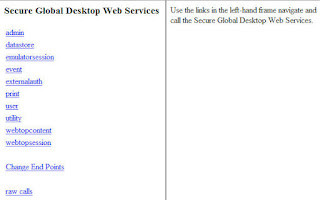


All available API-calls can be issued by using the menu. Most of the menu-items have a sub-menu with the actual API-calls. In the following example we will only use the menu-items 'webtopsession' and 'emulatorsession'.

Example:
Start an Application by using the API-test pages.
(SSGD version 4.4 and higher)

To manually start an application using API calls at least to following steps need to be performed:
  1. Authenticate the user
  2. Set the configuration of the TCC (The SGD Client Connector)
  3. Start the TCC
  4. Start the SGD Application
Authenticate the user
Since SSGD version 4.4 it is not needed to set up a new session before authentication, but the authentication can be done directly. Basically there are two types of authentication:
  • System Authentication; The authentication is performed from within SSGD using the provided username and password.
  • Third Party Authentication; The authentication is performed by a trusted external application/service which passed the user-ID to SSGD.
In this example we will be using the System Authentication for simplicity.

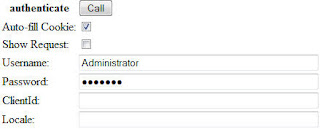
Authenticate the user by using the main API-test menu item: webtopsession
Use the function: authenticate
The only mandatory fields are 'Username' and 'Password'. Use a valid username and password and use the button 'Call' to perform the authentication.

In the right frame the result is shown with the most important attribute 'scottasessioncookie'. This attribute contains the ID of the 'webtop'-session. With the field 'Auto-fill Cookie' enabled the the session ID will be filled in automatically for all following API calls.

Set the configuration of the TCC
Before starting the SGD Client Connector (TCC) we must provide where the TCC can be downloaded, which version of the TCC must be used and which OS the user is using. This information can be specified via the setTCCConfiguration API-call (API-test main menu -> webtopsession -> setTCCConfiguration). By default all information is already filled in with the known information. (There is no need to change this information for use with the API-test tool, unless you are using SSL-offloading or using an external webserver).
Just a click on the 'Call' button is sufficient to provide all information.

Start the TCC
The TCC can be started via a separate webpage containing the TCC-Helper-plugin. This plugin is a Java-applet which will:
  • Check if the correct TCC is already 'installed', if not download the TCC
  • Start the TCC with the correct parameters
To create the TCC Helper webpage containing the required applet and parameters the API-call 'startTCC' can be used (API-test main menu -> webtopsession -> startTCC). Besides the 'Session Cookie' no extra information is required. The parameter 'Target' can be used to open the new webpage in a particular frame.

If all goes well the TCC will be started and we are ready to start a SSGD Application.

Start the SGD Application
An application can be started by starting an Emulator Session. We therefor switch to an other main menu item: emulatorsession.
The API-calls in the group 'emulatorsession' can be used to start, resume, suspend and list application sessions.

To start an application go to the API-call startSession (API-test main menu -> emulatorsession -> startSession). Fill in the Application Name (like: .../_ens/o=applications/cn=My Desktop) and click 'Call'.
To see which applications the user may start an API-call from the 'webtopcontent'-group must be used (searchWebtopContent), but a simple shortcut for this command is available: 'List Webtop'

The Application will start up just like it will be when clicking the Application-link in the browser-based-webtop.

Same Example in JSP-file

On the Sun wiki a example JSP-file is available which performs the same API-calls: Single sign-on JSP

By placing the attachement in the directory
/opt/tarantella/webserver/tomcat/[version]/webapps/sgd
After providing the same information from the example above in the JSP-file, the manual called API-calls can be performed automatically.


Example Summary

Perform the following API-calls to start an application:
  1. webtopsession -> authenticate : Provide Username and Password
  2. webtopsession -> setTCCConfiguration
  3. webtopsession -> startTCC
  4. emulatorsession -> startSession : Provide Application-name

Saturday, December 20, 2008

Playing around with the SSGD API (Part 1: Introduction)

Sun Secure Global Desktop has a Web based Application Programming Interface (API). This API can be used to interact with the SSGD server from within a browser (by creating for instance JSP-files) or by creating a piece of java code to communicate with the SSGD server over http(s).

This opens up a lot of extra possibilities besides the already feature rich SSGD webtop, the web based Administration GUI and the other default options (like the Integrated Mode, Automatic Client Login). A few examples of features to be created using the API:

  • A search page in the webtop; Let the user search for applications based on application name. might be handy if the user is presented with lots of applications.
  • Remote Administration; Create applications objects from other systems (like Sun Identity Manager), create delegated administration.
  • Create a webtop alike alternative without using a browser; With some java programming it is possible to re-create something with the same options as the webtop without use of a browser.
  • Create a SSGD Health check; Most external hardware Load Balancer are able to check a specific webpage to verify the correct workings of the website besides the mostly used 'HTTP 200 OK' / Default HTTP check. The new health check can for instance perform the 'Tarantella status' command to enhance the health check by verifying the SSGD server is working normally.
It is my intention to explain how to work with the SSGD API in the next couple of blog posts. For the readers who do not want to wait and start playing with the API take a look at the Sun Wiki: Web Services Home Page.

Part 2 of this blog post serie will be about the API-test pages which are installed during the installation of Sun Secure Global Desktop.

Friday, December 19, 2008

SSGD Mac OS10.5 no key input possible

Today one of our customers stated that on their Mac clients the keyboard input was not passed to the applications provided by Sun Secure Global Desktop. They have searched the internet for a solution, but it is hard to find the simple fix.

Since MacOS 10.5.1 the location of the file XKeysymDB has been changed. When creating a symbolic link for this file in the 'old' location resolved the issue mentioned above.

ln -s /usr/X11/share/X11/XKeysymDB /usr/X11R6/lib/X11/XKeysymDB


Hopefully this post will make it easier to find this little fix.

Friday, November 14, 2008

Prepare system users before installation

The Installation Guide of Sun Secure Global Desktop 4.41 states:

The system must have ttaserv and ttasys users and a ttaserv group before you can install SGD.


The commands to create these users are described in the Installation Guide, but there might be a simpler way to create them.

Last week I performed an installation and thought the users had been created. After the hitting the "Enter"-key for the installation I got a message stating the ttasys and ttaserv users could not be found and to create these users the following command can be performed:

/tmp/SGDCreateUsers.sh


Just run this script to create the ttasys and ttaserv users including the ttaserv group. Re-issue the installation command and continue with the installation process.

So installing is getting simpler and simpler. Almost so simple no Manual needs to be used, but I advise to always use the Installation Guide open during installation. Especially the Operation System Modifications page.

Sunday, August 24, 2008

Sun Secure Global Desktop 4.41 released

The 4.41 version of Sun Secure Global Desktop has been released and can be downloaded via the following link:


https://cds.sun.com/is-bin/INTERSHOP.enfinity/WFS/CDS-CDS_SMI-Site/en_US/-/USD/ViewProductDetail-Start?ProductRef=SGD-4.41-SP-LX-G-F@CDS-CDS_SMI


This updated contains the following updates/changes (see blog post "ssgd4.41 to be released soon" :

  • New Command for Securing an SGD Server

  • Pull-Down Header for Kiosk Mode Applications

  • Service Tag Support

  • Active Directory Authentication Log Filter

  • Active Directory SSL Security Without Client Certificates


Documentation of the 4.41 release can be found at:
http://docs.sun.com/app/docs/coll/1706.3

and on
http://www.filibeto.org/sun/sgd-users/sgd.html#sgd-4.41-docs

Wednesday, July 30, 2008

SSGD version 4.41 to be released in September 2008

Sun is releasing the new version of Sun Secure Global Desktop (4.41) in September 2008.

The release date was announced in the Sun Secure Global Desktop Forum:

(http://forums.sun.com/forum.jspa?forumID=815)


The release notes of this new version can be found at:
http://docs.sun.com/source/820-4905/index.html

Saturday, July 26, 2008

SGD Enhancement Module on Windows 2003 64 bit

This week I got a question from one of our customers: Is the the SGD Enhancement Module (formerly know as Tarantella Enhancement Module/TEM) supported on Windows 2003 64 bit?

The answer would be simple when looking at the "SGD Enhancement Module Requirements" on
http://docs.sun.com/source/820-2548/chapter1.html#d0e1434
but there was only a statement which said:

Supported Version - Windows 2003


But no reference to it being the 32 bit or the 64 bit version.

A quick question to Sun gave the following response:

We explicitly call out the systems where we support just 32 bit.
Here only the Linux OS's are 32-bit versions. All the other
OS's are both 32-bit and 64-bit versions. It's a implied.


This means the SGD Enhancement Module is supported for Windows 2003 64 bit (as well as the 32 bit version).

Wednesday, July 23, 2008

SSGD version 4.41 to be released soon

A small update to the Sun Secure Global Desktop is about to be released. This update contains 5 new features (besides 123 bug and 1 documentation fix).


  • New Command for Securing an SGD Server

    A very easy command to enable security without changing files, creating certificates manually. More on this subject in a later post.

  • Pull-Down Header for Kiosk Mode Applications

    Sometimes needed to temporary switch between your local and remote session. This option can be changed per application on the command-line.

  • Service Tag Support

    More information on Sun Connection: Register

  • Active Directory Authentication Log Filter

    Once again a better way to perform debugging :)

  • Active Directory SSL Security Without Client Certificates

    This will make it easier to connect to Active Directory in a secure way. The secure connection is needed to be able to let users change there Active Directory password via SGD.


The documentation of this new release can be found on the document website of Sun: Sun Secure Global Desktop Software 4.41 Collection. (With a PDF-version of the Administration Guide :) )

The SSGD 4.41 version is currently not yet available for download, but will be soon.

Saturday, May 24, 2008

Some lesser know extras of Sun Secure Global Desktop

There are some extra features of Sun Secure Global Desktop (SSGD) which are only known to a few SSGD Administrators. It is my intention to post information on these features on this blog.

Today I will start with a set of pages for Administrators and SSGD Developers and explain what their function is.

If you have SSGD installed take a look at:

http(s):///sgd/admin

On the URL above the following subdirectories are visable:


  • apitest; Pages for developers to test SSGD API calls,

  • checker; A simple reloading page to see who is logged on,

  • configmgr; The old configuration wizard (used to be available on the Administrator webtop),

  • datastore; a very simplistic view of all the object in the datastore (nice for Developers),

  • loaddist; Contains the swcd.jsp, which is a software based SSGD Loadbalancing script (I will surely post more on this one in a separate post),

  • printman; Shows the printqueue of SSGD,

  • profiles; Create or edit the profiles for the current user,

  • sessman; The old SSGD Session Manager,

  • sessmgr; A simple (not reloading page) to see who is logged on,

  • sessxml; Also a simple (not reloading page) to see who is logged on<./LI>


Most of these pages require an SSGD Administrator to log on before they show information. Normal users are unable to get more information then they get on theire normal webtop.

Although it is save to have these webpages open on the internet I want to suggest to disable access to these pages or completely remove them from your system (a move of teh directory "/opt/tarantella/webserver/tomcat//webapps/sgd/admin" to "/tmp" will do as well).

More on these extra lesser known features in later posts.

(PS: Sorry for the 3 month silence not posting to my blog. I will do my best to make sure this won't happen again.)

Sunday, January 20, 2008

New java version resolves Active Directory bug for SSGD

There was a small bug regarding password changes during the authentication process when Sun Secure Global Desktop (SSGD) is using the Active Directory authentication. This bug was a bug in the underlaying Java of SSGD. A new version of Java is available since this week with a fix for this bug.

Information and instructions to upgrade the Java version for SSGD see the blog post on Mr PotatoHeads blog:
Potato Peelings

A deep dive in the Alps

Last week I attended the "Deep Dive in the Alps"-event (officially know as Software Technical Event @ Sun Grenoble Engineering Center).

Lots of new information, too many things to put in one post. Therefor I will make multiple posts about the Deep Dive in the Alps :)

A small starter:


An Enterprise portal is a framework for integrating information, people and processes across organizational boundaries. It provides a single point of entry and is designed to aggregate information through application-specific portlets.

"Portals unlock business processes and resources for external access,
while maintaining the security, identity and access controls"

- The Burton Group


The current portlet version (1.00.901) is working for SSGD 4.2/4.3/4.3.1
Since there have been made changes in the authentication a new portlet will be created. The new portlet will make use of the new Web-services for SSGD.


Although the dive in the Alps was deep,
"The world is Flat"